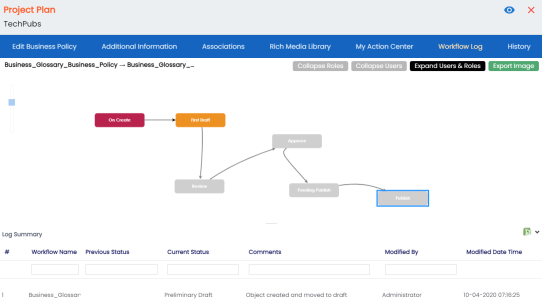
You can view the flow of actions of the workflow assigned to a business policy. Along with other information, the workflow log displays the current state of the business policy in the workflow.
To view workflow log, follow these steps:
-
On the Compact View tab, click
 . Then, click
  .
.
Alternatively, on the Grid View tab, under the Options column, click
.The business policy opens in edit mode.
- Click the Workflow Log tab.
By default, it displays only the stages of the workflow and highlights the current stage.
Use the following options to view more information:- Expand Users & Roles
Use this option to display users and roles associated with each workflow stage. You can choose to hide users or roles using the Collapse Users and Collapse Roles options.
- Log Summary
Use this pane to view the log of the actions performed.
You can export the workflow log summary in XLSX format. Click
 to export the summary.